
my current claude code setup
another listicle!

I’ve gone through a lot of trial and error figuring out which MCP plugins are worth having versus which ones bloat your setup, how to structure your .claude folder, and more. Here’s where I’m at so far!
my must-have plugins
context7- up-to-date docs for any library you’re using.I added this specifically because I kept catching Claude getting AWS stuff wrong, and I'm not trying to spend time arguing with it over API behavior. I now just tell it to use context7 by default.
typescript-lsp- gives Claude live type information while editing your code.playwright- handles browser automation and e2e testing.It’s great for testing bugs you don’t want to screenshot back and forth every time. You just let Claude run the browser and verify the fix itself.
superpowers- enforces a brainstorm → plan → implement workflow, deploys subagents between independent tasks, and writes progress to markdown files so you don't lose context mid-session.My favorite plugin by a wide margin. It’s so good for end-to-end development. Its subagents speed up everything, and it’s really good at proactively clarifying every nuance about what you want to build at the very start.
code-simplifier- refactors code toward simpler solutions.I hate unnecessary complexity, and Claude can trend toward it in longer sessions.
pr-review-toolkit- reviews your code before you hand it off or merge.I want to screen for anything I might have missed personally and reduce long PR timelines, especially in my work at Notion.
situational picks
frontend-design- generates decently unique UI.I love how it puts out unique work that does not match generic AI aesthetics. It also checks up with what kind of vibe you want to convey. Worth experimenting with if you want a good enough-looking UI.
claude-md-management- cleans up and reorganizes your CLAUDE.md when it gets messy.Mine is pretty lean, so I rarely touch this one.
cc-safety-net- blocks destructive commands before they run.I like this for when I’m working on something important that I can’t afford to have Claude nuke by accident.
chrome-devtools-mcp- gives Claude direct access to a live Chrome browser.I go back and forth on whether I like this more than
playwright. I do findchrome-devtools-mcpfaster, but I thinkplaywrighthas an edge for testing on mobile. If I did more pure frontend work, I’d probably keep both on rotation.
general setup
I put everything that isn’t project-specific in a global ~/.claude and only use project-level configs for codebase-specific conventions.
A lot of how I think about this came from working at Notion. Their .claude setup is one of the most built-out ones I’ve seen. I carried a lot of those patterns into my own setup.
agents are task-specific Claude personas, things like a type-error fixer, a code style reviewer, a UI change validator. Each one is a markdown file that tells Claude exactly how to behave for that task. That said, I don’t set these up for every repo, only when I’m going deep on a codebase and hitting the same tasks repeatedly.
commands are reusable slash commands I reach for across projects. I keep this pretty minimal. I highly recommend stealing applicable commands from other open-source repos as well.
skills are detailed reference docs for specific technical contexts, so Claude isn’t working from general knowledge. Also minimal by default.
Notion also uses a hooks folder too, but I don’t really do that.
models!
I spam Opus 4.6 for most things since Notion covers it. For custom debugging agents, I drop down to Sonnet - it’s more than enough for focused, scoped tasks. I also don’t find /fast noticeably faster in practice, so I tend to skip it.
on version control and sandboxes
I tell Claude globally not to touch GitHub. I’m a big Graphite fan and a control freak about what stages and commits. I’ve tried getting Claude to use Graphite commands, but I still don’t fully trust what it tries to stage, so I just handle all version control myself. Claude writes the code, and I move it through git.
For everything else, I run sandboxes pretty often when I'm experimenting or just don't want to babysit every command. It keeps me from having to worry or press accept constantly, which dilutes my focus.
on context engineering
I’m still trying to get better at context engineering.
A good quote from this note on Advanced Context Engineering For Coding Agents (shoutout Uttej for the rec):
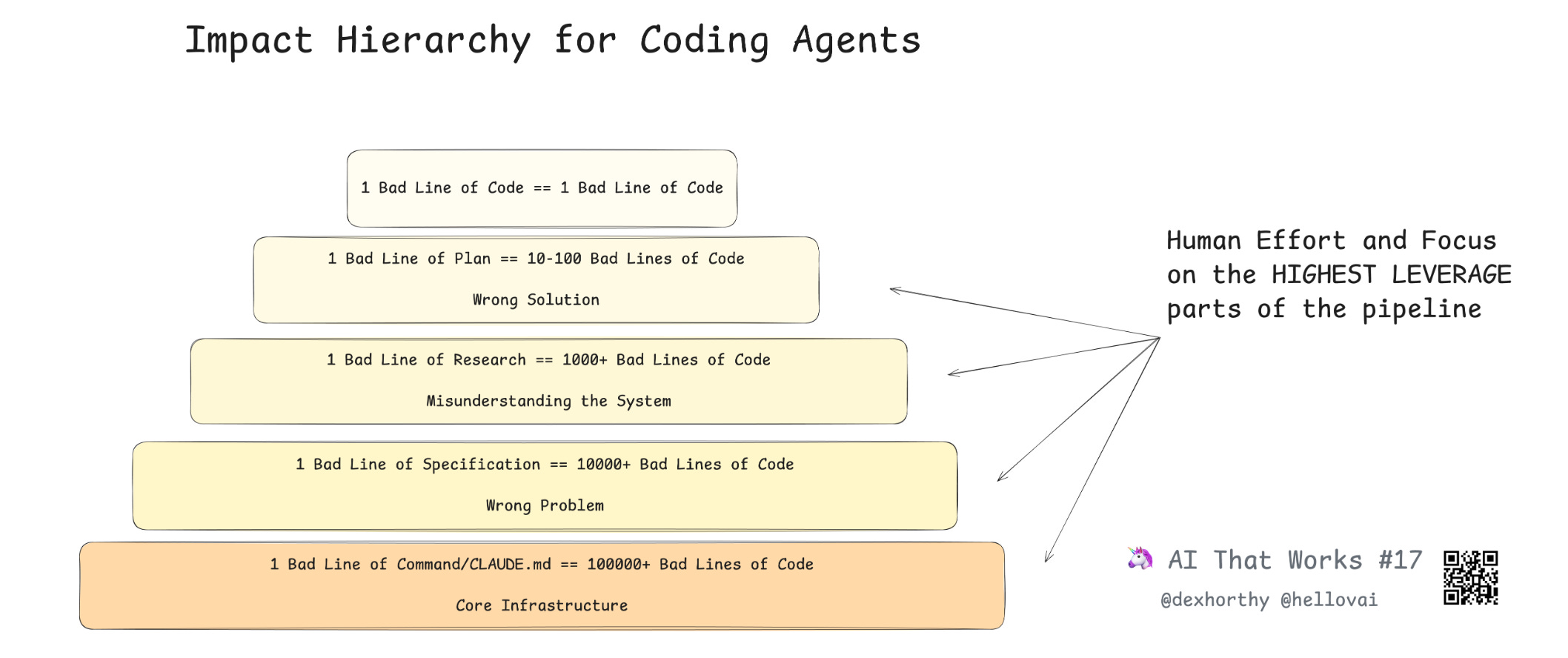
Put another way, the worst things that can happen to your context window, in order, are:
Incorrect Information
Missing Information
Too much Noise
That framing changed how I think about plugins. Most of my time in a session goes toward research and gathering the right context upfront, not writing code. The reason I value superpowers so highly is that it directly addresses the missing information problem - it forces Claude to surface and clarify every gap before touching any code. It also helps me pick out incorrect information faster as plans are being written out. For big changes, I keep progress.md files so Claude has a persistent record of where things stand between sessions.
If you find yourself resteering mid-implementation, that’s a sign that something went wrong earlier. My approach is to revert all new code when that happens and restart with better research and planning. Never try to patch your way out of a bad direction.
things i want to try
I’ve seen people customize their Claude Code status bar. I think this Bash script appeals to me a lot because I like to understand what’s going on more quickly when I’m switching between Claude Code sessions.
I’ve been debating swapping out
cc-safety-netfordestructive_command_guard. The safety net is lighter weight, but I hear DCG is better for non-obvious destructive behavior.edit: I ended up cutting both! I think I got over my destructive command paranoia and continue to run everything in Claude Code sandboxes.
Using
/contextmore to clear up unnecessary context 🧼I’ve been recommended
agent-browserinstead ofplaywright, and it sounds like it’d kill a lot of bloat. I am very eager to try it alongside some custom skills for how I’d want an agent to do e2e browser testing.Somehow, I haven’t gotten into Git worktrees yet because I usually work on small projects or stacked PRs. I think it’s going to be great for parallel work.
edit: I started using this occasionally, though I found them to actually be overkill for my setup. I continue to work on small repos that don’t justify the setup overhead, or on larger repos with stacked changes (which Graphite already has enough branch management support for).
More to come! I'll update this section as I go :)
a note if you’re starting from scratch
Install fewer plugins than you think you need. Every plugin you add gets loaded into Claude’s context window, which means Claude is spending tokens on tool definitions before it’s even touched your problem. Keep your CLAUDE.md clean, let the global config do the heavy lifting, and add more only once you know what you’re actually missing.
The more you use the context window, the worse the outcomes you'll get. Less is more!!
I wrote this post because, as someone without many friends in tech, I think there’s a lot of value in sharing what devtools we’re using and why. A lot of my current setup came from friends putting me onto new things and pair programming sessions (special shoutout to Sarah for recommending a significant amount of this list). I’d be thrilled to talk to more folks about what setups and approaches to development they’ve found valuable - DM me!
And on that note, enjoy what made it back into my playlist rotation this week:
The bit about telling Claude globally not to touch GitHub resonated. I'm similar; I want full control over what stages and commits.
You mention Notion uses hooks but you don't. I'd push back on that one a bit. If you're running with skip-permissions (or even if you're not), hooks are the only deterministic way to stop Claude from doing something destructive. CLAUDE.md is a suggestion; hooks are a contract. I wrote a guide with 10 copy-paste recipes for git automation specifically (https://reading.sh/claude-code-hooks-a-bookmarkable-guide-to-git-automation-11b4516adc5d) and the branch protection one alone has saved me more than once.
The cc-safety-net plugin sounds like it's trying to solve the same problem hooks solve natively. Have you compared the two? I found hooks more reliable because they're baked into the tool execution lifecycle rather than sitting in a plugin layer.
goated